






 650
650 


You type a question into Google, and instead of getting ten blue links, you receive a direct, conversational answer that actually understands what you’re asking. That’s AI mode in action—and it’s fundamentally changing how we interact with search engines.
AI mode represents Google’s evolution from traditional search to conversational AI-powered search. Built on the Gemini language model, this interface synthesizes information from multiple sources to deliver comprehensive answers rather than forcing you to click through dozens of websites. Instead of matching keywords, AI mode interprets intent, follows context across multiple questions, and engages in genuine back-and-forth dialogue.
The shift matters because traditional search was built for a different era. Sundar Pichai, Google’s CEO, stated that AI mode “represents the future of how people will find and interact with information online.” Rather than adapting your questions to match how search engines think, AI mode adapts to how you naturally communicate.
This guide breaks down exactly what AI mode is, how it works differently from standard search, and why understanding this technology matters for anyone who relies on finding accurate information quickly.

How AI Mode Works - Technical Mechanisms
Behind every AI mode conversation lies a sophisticated process that transforms simple questions into comprehensive answers. The technology relies on two core mechanisms: query fan-out and retrieval-augmented generation (RAG).
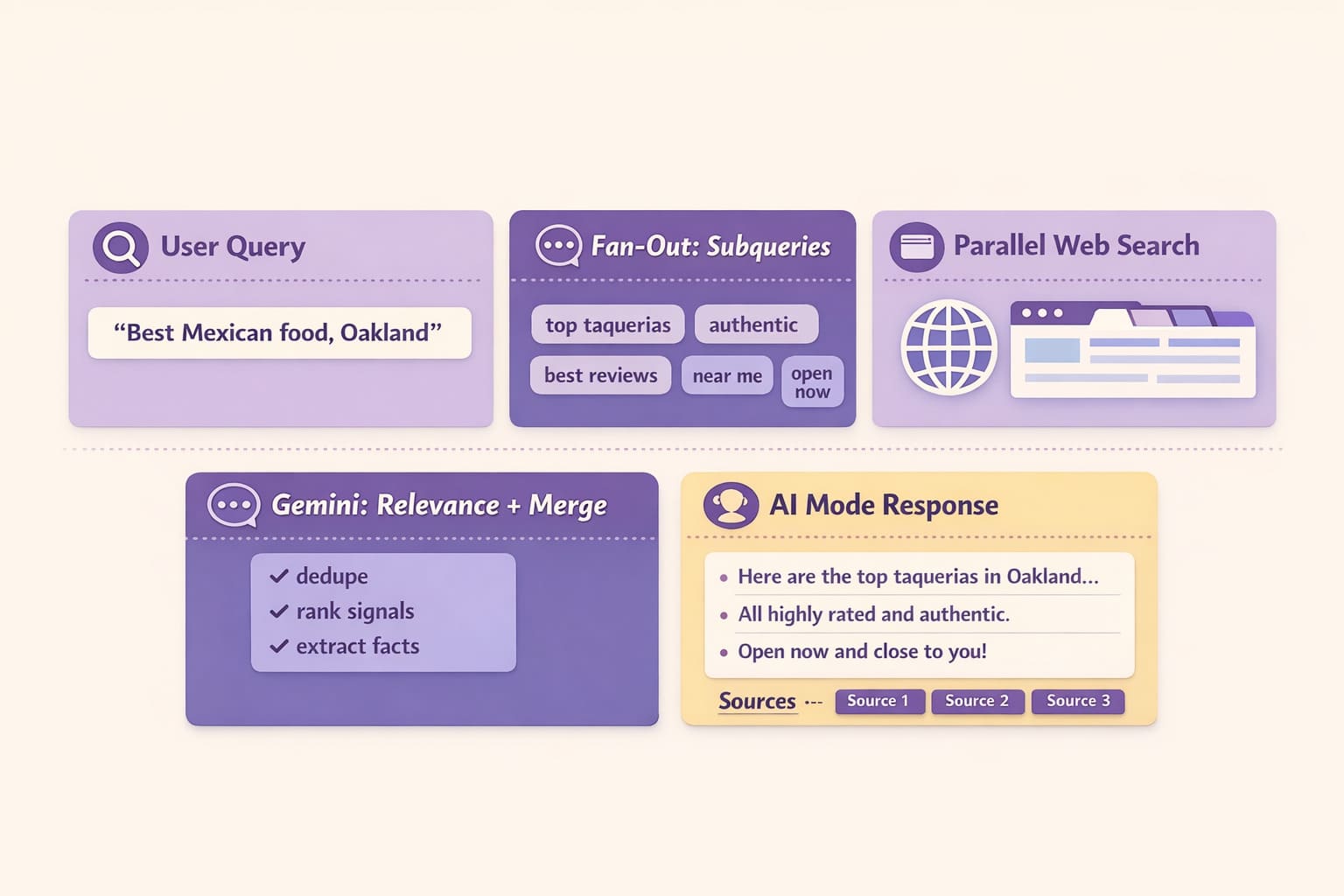
Query fan-out is where the magic starts. When you ask “best Mexican food Oakland,” AI mode doesn’t just search that exact phrase. Instead, it generates multiple related subqueries simultaneously—”top taquerias Oakland,” “great Oakland Mexican restaurants,” “authentic Mexican cuisine Bay Area”—and executes them concurrently. This multi-query approach eliminates keyword gaps that plague traditional search, ensuring comprehensive coverage of your actual intent.
Here’s the complete chain in action:
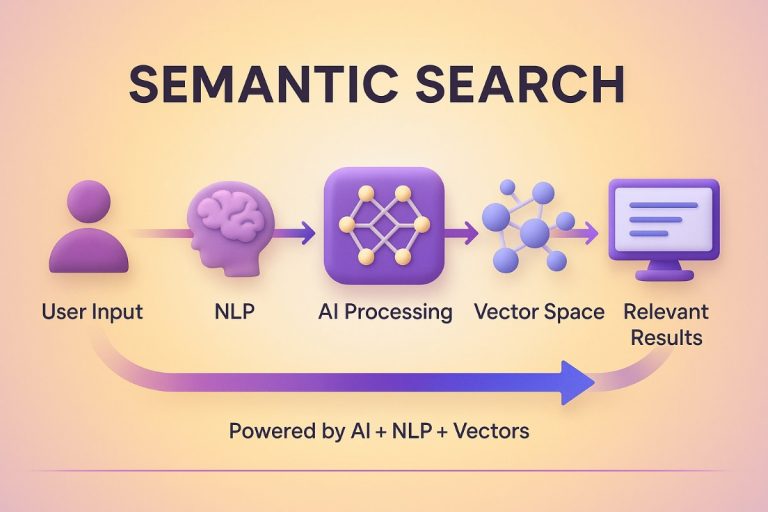
User Query → Multiple Subqueries Generated → Gemini Processing → Comprehensive Answer
Retrieval-augmented generation powers the accuracy you experience. While large language models like Gemini train on vast datasets, RAG enables real-time web access during conversations. Rather than relying solely on training data, AI mode retrieves current information from external sources, processes it through Gemini’s transformer architecture, then synthesizes everything into coherent responses. This combination of static knowledge and dynamic retrieval explains why AI mode can discuss breaking news or recently updated information.
The transformer architecture underlying Gemini processes these inputs through attention mechanisms—essentially weighing which information matters most for your specific question. Multiple queries feed in, the model identifies patterns and relevance, and you receive an answer that actually addresses what you meant, not just what you typed.
AI Mode vs AI Overviews - Key Differences
Google offers two distinct AI-powered search experiences, and understanding the difference prevents confusion. AI Overviews and AI mode serve different purposes, operate in different contexts, and reach vastly different audiences.
AI Overviews appear automatically at the top of traditional search results—those AI-generated summaries you see for about 1.5 billion searches monthly. They provide quick answers with citations, then show standard blue links below. You’re still in regular Google search; the overview is just one SERP feature among many.
AI mode, by contrast, represents a completely separate conversational interface. You actively choose to enter this mode, where multi-turn conversations replace the traditional search experience entirely. Instead of asking one question and getting one summary, you engage in dialogue—asking follow-ups, refining context, exploring topics deeper.
Liz Reid, Google’s VP of Search, explains: “AI Overviews help users get information faster within traditional search, while AI mode reimagines the entire search experience as a conversation.“
The scope difference matters most. AI Overviews handle single queries with synthesized answers plus links. AI mode maintains conversational context across multiple exchanges, remembering what you asked three questions ago and building on that understanding.
| Feature | AI Overviews | AI Mode |
|---|---|---|
| Type | SERP summary feature | Conversational interface |
| Placement | Top of standard results | Dedicated separate mode |
| Scope | Single-query responses | Multi-turn conversations |
| User Reach | 1.5B monthly users | 200+ countries, 35+ languages |
| Integration | Embedded in traditional search | Standalone experience |
| Response Format | Quick summary + blue links | Comprehensive answer + follow-up prompts |
AI Overviews serve a narrower function than AI mode—they enhance existing search, while AI mode replaces it entirely.
Key Features & Capabilities
AI mode isn’t just conversational search—it’s an evolving platform with capabilities that extend far beyond answering questions.
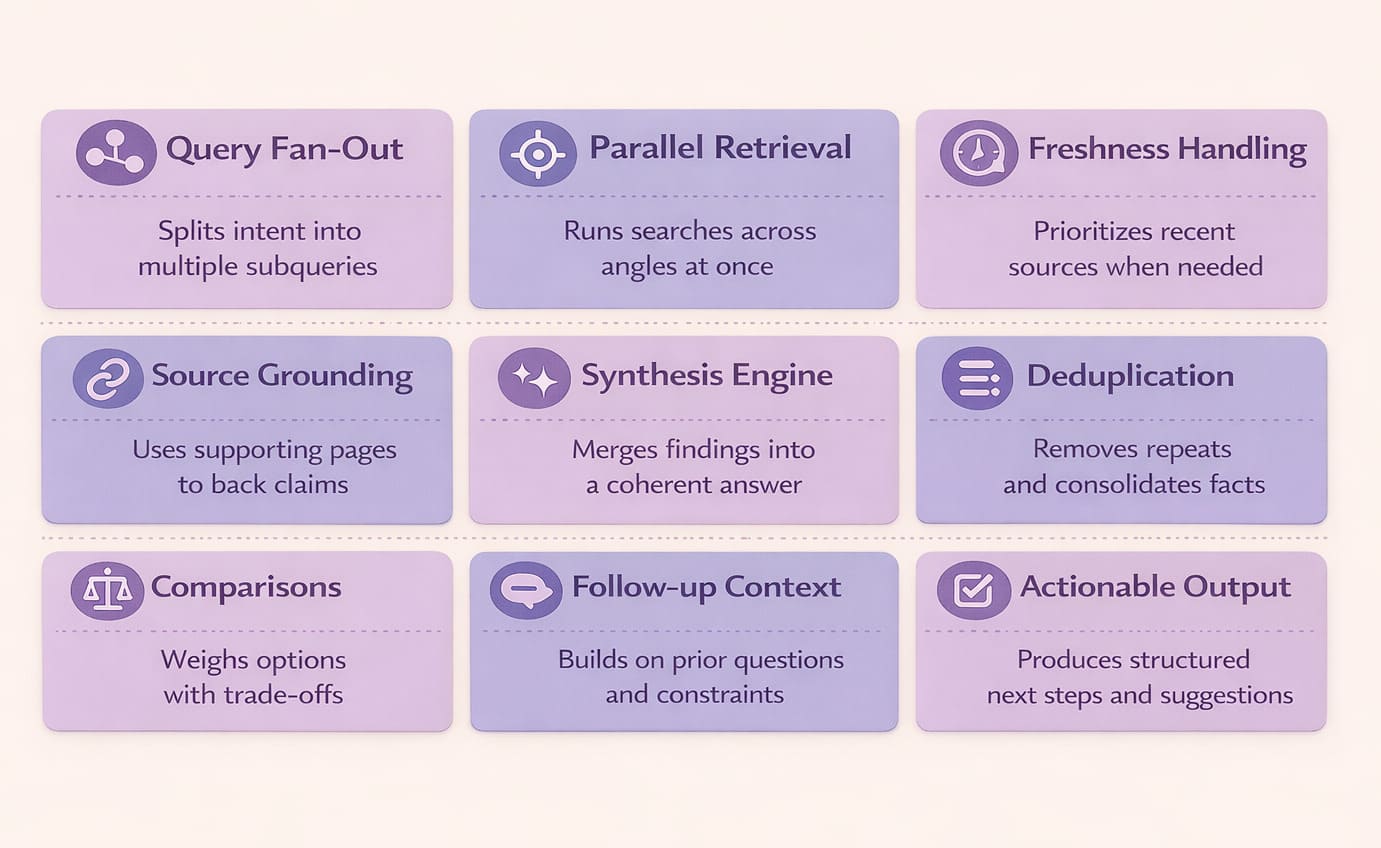
Deep Research transforms how you explore complex topics. Instead of getting surface-level answers, this feature conducts iterative multi-query exploration across dozens of sources, then synthesizes everything into comprehensive reports. Ask about “the impact of AI on healthcare,” and Deep Research doesn’t stop at one search—it explores multiple angles, identifies gaps, runs follow-up queries automatically, and delivers analysis you’d normally spend hours compiling.
Project Mariner takes AI mode into agentic territory. This experimental capability doesn’t just find information—it executes tasks. Book a restaurant reservation, compare flight prices and purchase tickets, fill out forms—Project Mariner interacts with websites on your behalf. Google executives describe this as “moving from answering questions to completing tasks,” fundamentally shifting what search can accomplish.
The conversational interface itself includes smart follow-up prompts—clickable suggestions that appear after each response, guiding you deeper into topics without forcing you to think of perfect questions. These prompts maintain conversation flow while introducing angles you might not have considered.
Multimedia integration pulls from Google’s ecosystem seamlessly. Ask about restaurants, and you see Maps integration with locations and reviews. Search for products, and Shopping carousels appear with pricing and availability. Look for tutorials, and YouTube videos embed directly in responses.
This structured data access gives AI mode advantages over competitors like Perplexity or ChatGPT—Google owns the pipes, not just the interface. Maps, Shopping, YouTube, and countless other services feed AI mode with proprietary information unavailable elsewhere.
How to Enable AI Mode
Getting started with AI mode requires opting into Google’s experimental features through Search Labs—a straightforward process, though not everyone finds it intuitive.
Activation Steps:
- Open Google Chrome and navigate to google.com
- Look for the beaker icon (Search Labs) in the top-right corner
- Find the “AI Mode” card in the available experiments
- Toggle the switch to “On”
- Click “Try an example” to launch your first AI conversation
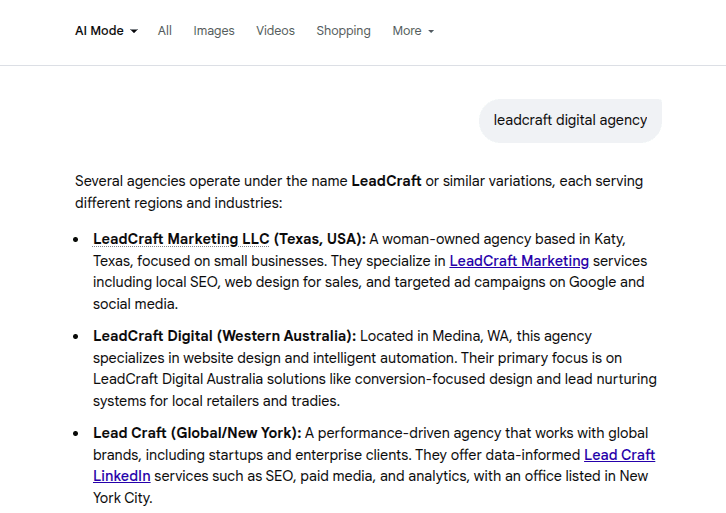

Current availability: AI mode has expanded to over 200 countries and territories worldwide, including most of Europe, the Middle East, North Africa, Asia, and the Americas. The feature supports 35+ languages, though initial rollouts began in English. Notable exceptions include France, where regulatory discussions continue.
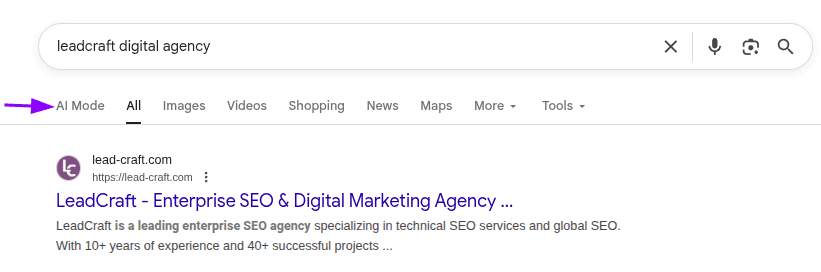
Once enabled, you’ll find three access points: a dedicated button on Google’s homepage, a new tab in search results labeled “AI Mode,” and at the bottom of AI Overviews where Google suggests “Continue in AI Mode.”
To turn off AI mode, simply return to Search Labs and toggle off the experiment. You can also ignore the AI Mode tab entirely and stick with traditional search tabs—both interfaces coexist independently.
Nielsen Norman Group research found that 4 out of 7 users initially failed to discover AI mode even after activation, highlighting discoverability challenges Google continues addressing through interface updates.
Competitive Landscape Analysis
AI mode enters a crowded arena where answer engines and conversational search tools compete for users tired of traditional blue links. Understanding how Google’s offering stacks up against established players reveals both strategic advantages and market dynamics reshaping information discovery.
Perplexity AI launched in 2022 as an AI-first answer engine, pioneering the conversational search experience that AI mode now emulates. The similarities are striking: both use clickable follow-up prompts, integrate multimedia content, and provide cited sources alongside synthesized answers. Perplexity built its reputation on transparency—clearly showing where information originates and when sources were published. Its clean interface focuses exclusively on answering questions without the complexity of traditional search features.
ChatGPT Search brings different strengths: broader capabilities beyond information retrieval, including content generation, analysis, and problem-solving. While it can search the web, ChatGPT functions as a general-purpose AI assistant rather than a specialized search tool. Its established user base—millions who already trust OpenAI’s platform—gives it significant momentum, though search remains one feature among many rather than the core focus.
Traditional search still holds advantages that AI tools can’t match: familiar interfaces, lightning-fast results without generation delays, and zero hallucination risk since it simply links to sources. For straightforward informational needs—checking business hours, finding specific websites, or quick fact-checking—traditional search often proves faster and more reliable.
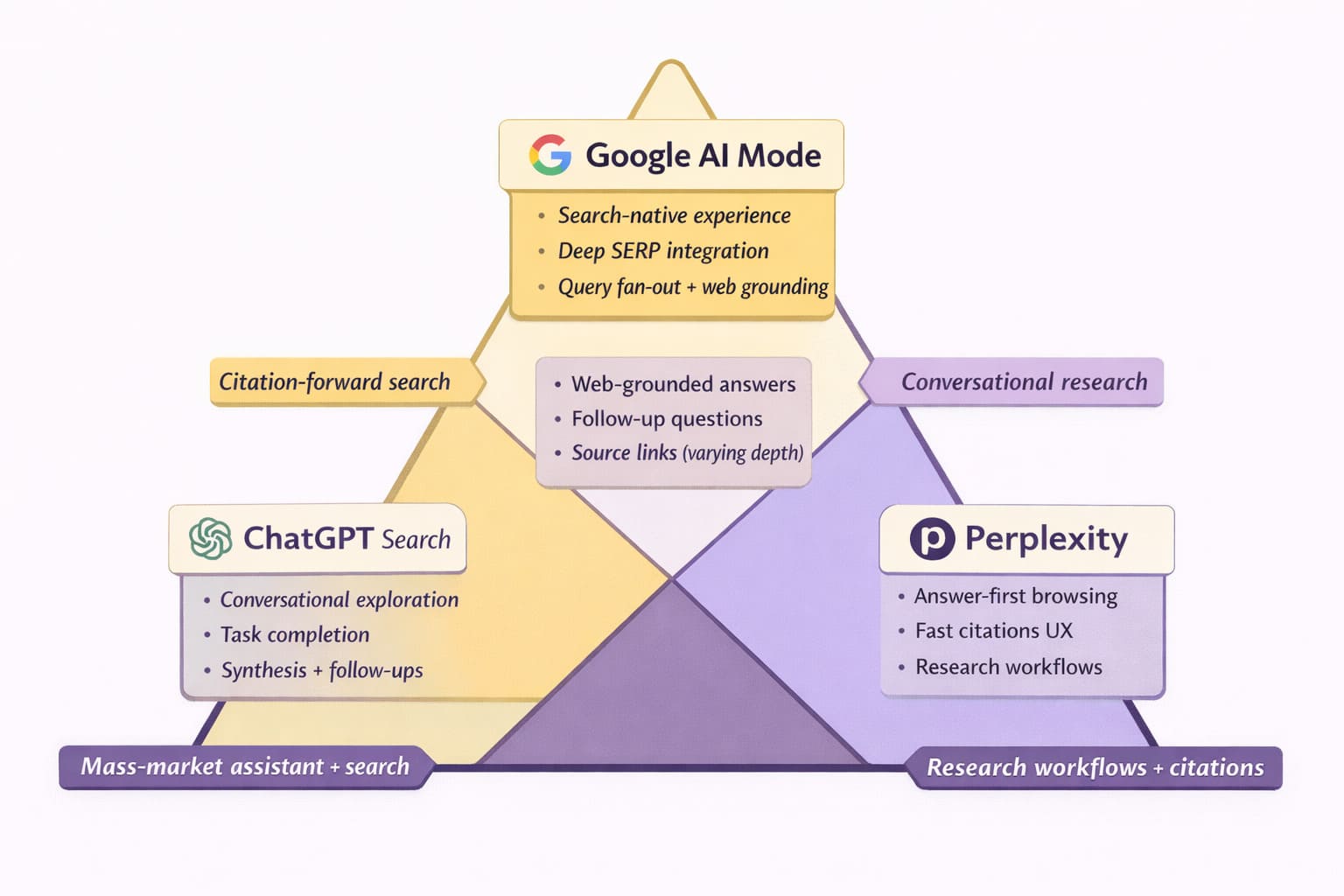
AI mode’s competitive edge comes from ecosystem integration. Google Maps, Shopping, YouTube, and the knowledge graph feed AI mode with structured data unavailable to independent platforms. This proprietary access enables richer, more comprehensive responses. As TechRadar noted, “Google wants to combine deep AI reasoning with its long history of crawling and ranking the web”—an infrastructure advantage competitors can’t replicate.
Perplexity maintains the first-mover advantage in conversational search, ChatGPT offers broader utility beyond search, and traditional Google retains speed and reliability. AI mode attempts synthesizing these strengths while leveraging Google’s unmatched data infrastructure—a strategy that could redefine search’s future if execution matches ambition.
SEO Impact & Optimization Strategies
AI mode fundamentally changes how content gets discovered and attributed. Traditional SEO optimized for blue link clicks; now, success means appearing in AI-synthesized responses—a shift requiring entirely new optimization frameworks.
Answer Engine Optimization (AEO) focuses on structuring content for AI parsing and citation. This means comprehensive entity-focused content that covers topics exhaustively rather than targeting specific keywords. AI mode looks for authoritative sources it can cite confidently, favoring content with clear source attribution, expert quotes, and structured formatting through headings and lists. When synthesizing responses, the system prioritizes content demonstrating expertise through depth rather than promotional language.
Generative Engine Optimization (GEO) addresses visibility across AI-generated results. Authority signals matter more than ever—your content needs credentials, citations, and comprehensive coverage demonstrating genuine expertise. AI mode interprets search intent differently than traditional algorithms, seeking sources that answer the complete question rather than matching keywords.
The impact on organic visibility is profound. Studies show that traffic to top-ranked sites can drop by up to 79% when their link appears below an AI Overview, with users finding answers directly rather than clicking through. Citation matters, but traditional traffic attribution breaks down when AI synthesizes your content into responses without driving clicks. Content depth requirements have shifted—surface-level articles rarely earn citations, while comprehensive resources become authoritative sources.
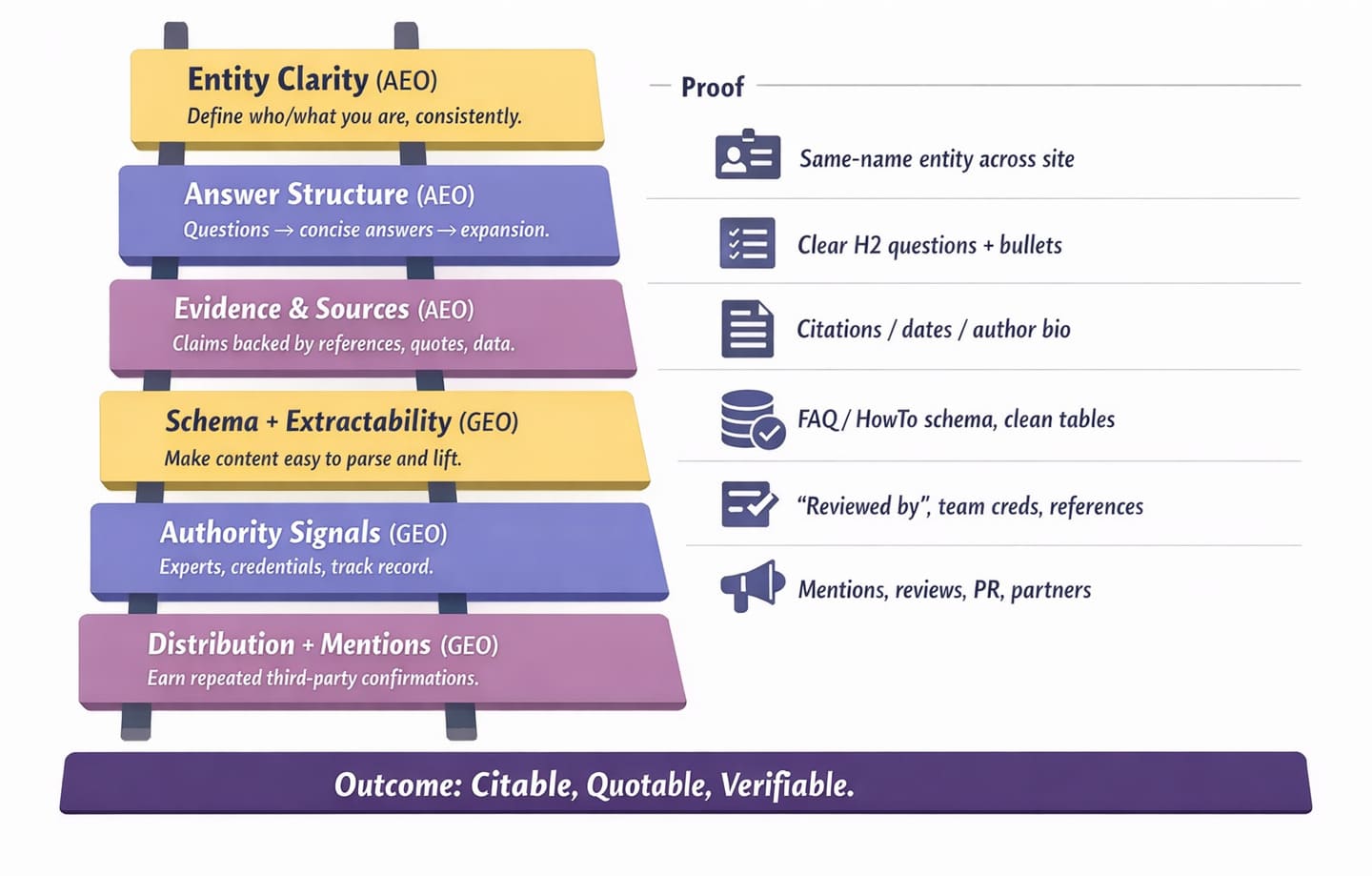
Practical optimization tactics:
- Create entity-focused content addressing topics comprehensively
- Include clear source attribution and expert quotes
- Use structured formatting (headings, bullet points, tables)
- Build authority signals through credentials and citations
- Address complete user intent, not just keywords
The challenge multiplies when optimizing across multiple AI platforms—AI Mode, ChatGPT, Perplexity, and Copilot each use different citation mechanisms and content evaluation criteria. Lead Craft’s Generative Engine Optimization services address this complexity through multi-platform strategies: content restructuring for AI readability, advanced Schema Markup implementation, and real-time citation tracking. This approach delivers measurable results—clients typically see 27-40% increases in AI citations within 3-8 months, capturing visibility as search behavior migrates toward conversational interfaces.
Limitations & User Experience Challenges
AI mode isn’t without problems. Understanding these limitations helps set realistic expectations and explains why adoption remains below projections.
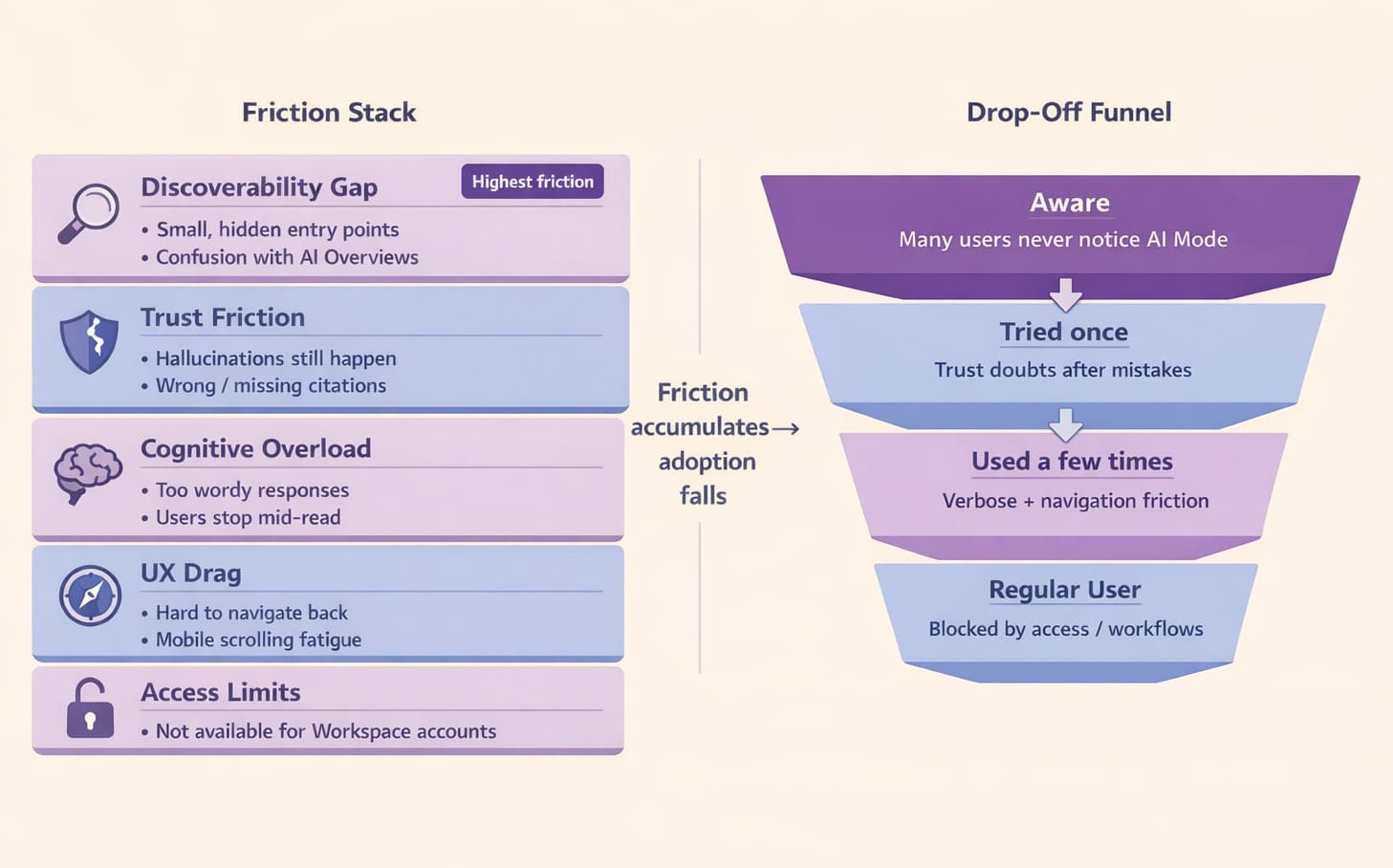
- Hallucination risk persists despite improvements. AI mode occasionally generates false information, particularly for niche topics or recent events where training data is sparse. Users report instances of non-existent citations or factually incorrect details mixed within otherwise accurate responses—a problem that erodes trust when discovered.
- Discoverability remains the biggest barrier. The Nielsen Norman Group study found 4 out of 7 participants hadn’t noticed or used AI mode before being directed to it. Poor visual prominence and confusion with AI Overviews create adoption friction. Many users don’t realize AI mode exists as a separate feature from Google’s other AI products.
- Wordy responses overwhelm users. AI mode tends toward comprehensive answers that participants in usability studies described as “too much.” Users frequently abandon responses mid-read, preferring concise summaries over exhaustive explanations. Navigation issues compound this—finding previous responses proves difficult, and mobile scrolling through lengthy answers frustrates users.
- Workspace limitations restrict adoption. Business accounts can’t access AI mode, eliminating a significant user segment that might benefit most from advanced research capabilities.
Google acknowledges these challenges and continues iterative improvements, but poor discoverability directly causes low adoption—a problem that superior technology alone can’t fix.
Future of AI-Powered Search
AI mode isn’t simply another feature—it represents Google’s vision for search’s transformation over the coming years. Understanding this trajectory helps anticipate how information discovery will evolve and what strategies matter most.
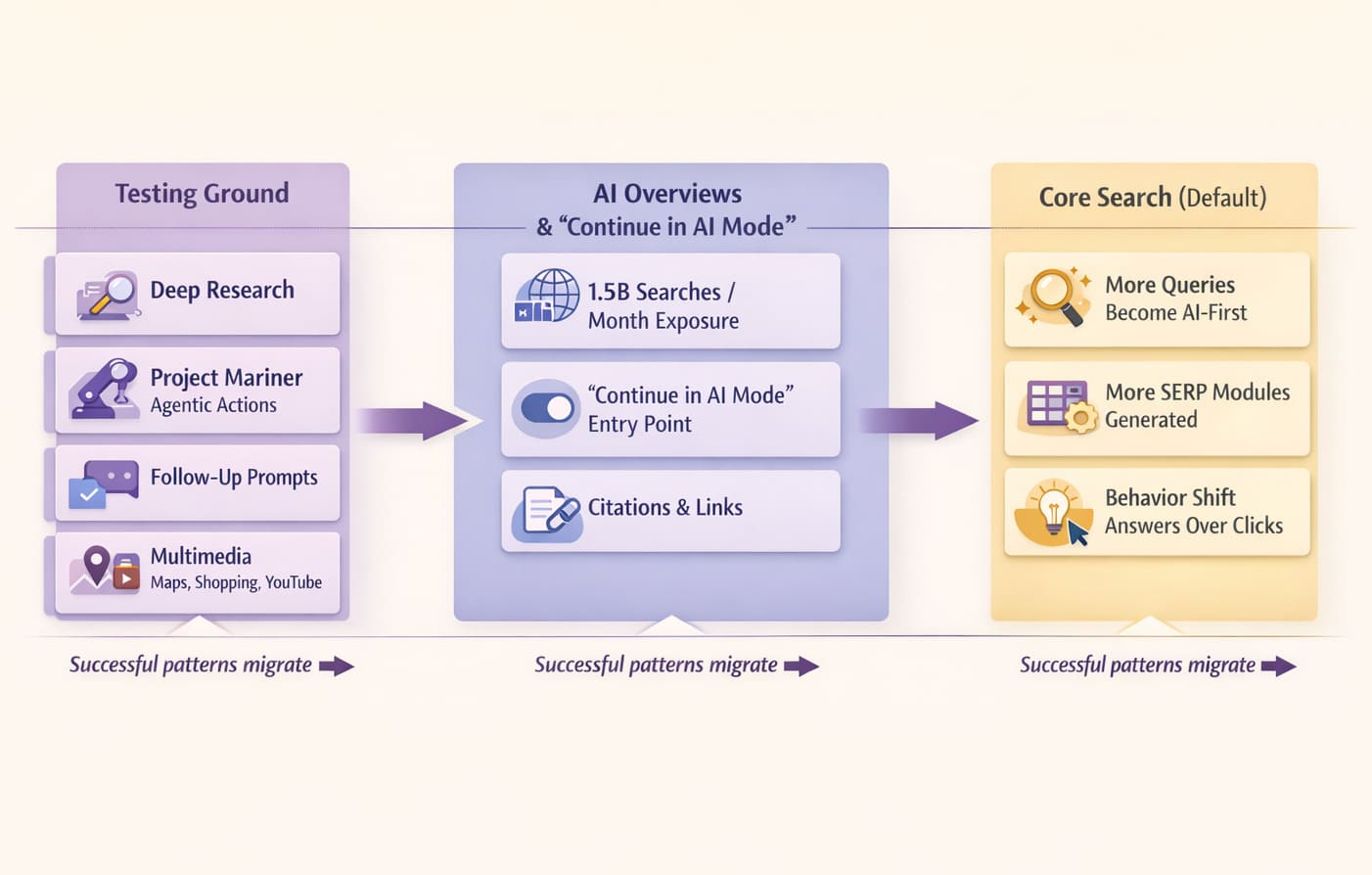
Nick Fox, Google’s VP overseeing Search, frames the shift clearly: “We’re talking about a shift from basic information retrieval to intelligence,” he explained at Google I/O. “These models enable a much deeper understanding of information and the ability to transform information.” This evolution moves beyond finding answers toward reasoning, synthesis, and problem-solving capabilities that fundamentally change what search can accomplish.
Liz Reid, Head of Search, positions AI mode as the testing ground for mainstream integration. “One of the exciting things with AI Mode is that while it’s our cutting-edge AI search, it also provides a glimpse of what we think can be more broadly available,” she stated. Google’s strategy involves taking successful AI mode features and incorporating them into core search experiences—a gradual mainstream adoption path rather than abrupt replacement.
The timeline is deliberate. AI Overviews already reach 1.5 billion users monthly, demonstrating massive-scale AI integration. AI mode remains experimental but expanding globally, serving as the innovation laboratory where Google tests advanced capabilities before broader rollout. This phased approach balances innovation speed with reliability requirements at Google’s scale.
Emerging capabilities signal where search heads: AI-generated videos and podcasts that synthesize information into multimedia formats, custom web applications built on-the-fly for specific tasks, and full problem-solving that completes multi-step processes rather than simply providing information. Project Mariner’s agentic actions hint at search becoming an active agent rather than passive information retriever.
The web ecosystem implications are profound. Traffic patterns shift from click-based attribution to influence-based visibility. Publishers face pressure adapting to environments where citations matter more than clicks. Content strategies must balance serving AI systems while maintaining direct audience relationships.
As Reid noted, “We believe we’re entering the web’s most exciting era yet.” Whether that optimism holds depends on successfully navigating the tension between technological capability and ecosystem sustainability.
Conclusion
AI mode represents more than Google’s latest feature—it signals a fundamental paradigm shift in how we discover and interact with information online. Powered by Gemini with RAG-enhanced accuracy and query fan-out comprehensiveness, this conversational interface transforms search from link retrieval into intelligent dialogue.
The competitive landscape reveals Google’s strategic advantage: while Perplexity pioneered conversational search and ChatGPT offers broader capabilities, AI mode leverages Google’s unmatched ecosystem integration—Maps, Shopping, YouTube, and proprietary structured data that competitors cannot replicate. This infrastructure advantage positions AI mode uniquely, though execution challenges around discoverability and user adoption remain significant.
For marketers and content creators, the implications are clear: traditional SEO alone no longer suffices. Answer Engine Optimization (AEO) and Generative Engine Optimization (GEO) become essential, requiring content strategies focused on comprehensive entity coverage, structured formatting, and authority signals that AI systems prioritize for citations.
Your next steps: Enable AI mode through Search Labs and experiment firsthand with conversational search. Audit your content strategy for AI readability—are you creating comprehensive resources that answer complete questions, or surface-level content that AI systems ignore? Monitor how search continues evolving, because AI mode’s experimental features today become tomorrow’s mainstream search experience.
The shift from information retrieval to intelligence has begun. Adapt now, or watch visibility erode as search behavior migrates to AI-powered interfaces.
FAQs
How do I turn on AI Mode on my phone?
Open the Google app on iOS or Android, tap the Search Labs icon (beaker symbol), locate the AI Mode experiment card, and toggle “Try it” to enable. The AI Mode button then appears in your search interface. Currently available in 200+ countries with 35+ language support for personal Google accounts. Alternative: visit google.com in your mobile browser and click the AI Mode button. Requires the latest Google app version.
Is Google AI Mode free?
Completely free for personal Google accounts globally. No subscription fees, usage limits, or hidden costs. Included with standard Google Search access. Limitation: not available for Google Workspace accounts. Free access includes all features: Deep Research, Project Mariner, Search Live, and unlimited queries.
What’s the difference between AI Mode and regular Google search?
Traditional search returns a list of blue links ranked by algorithms; AI mode synthesizes information from multiple sources into comprehensive answers. Traditional search requires clicking through results; AI mode provides immediate synthesized responses with follow-up prompts. Traditional search is keyword-based; AI mode uses conversational natural language. AI mode enables multi-turn conversations; traditional search treats each query independently. Both access the same web index, but AI mode adds a Gemini-powered synthesis layer.
Can I turn off AI Mode and use regular search?
Click the “All” tab in search results to switch to traditional Google search. To disable completely: open Search Labs and toggle off the AI Mode experiment. Alternative: avoid clicking the AI Mode button and use standard search. AI mode doesn’t replace traditional search—it coexists as a separate option.
Which AI search tools are completely free?
Google AI Mode (fully free, 200+ countries), Perplexity (free tier: 5 Pro searches/day, unlimited Quick searches), ChatGPT free tier (GPT-3.5 model, limited GPT-4 access), and Bing Copilot (free with Microsoft account). Google AI Mode offers the most generous free access with ecosystem integration. Perplexity Pro ($20/month) removes limits. ChatGPT Plus ($20/month) provides GPT-4 access.
Does AI Mode work with Google Workspace?
Currently limited to personal Google accounts only. Workspace (business/education) accounts cannot access AI mode. This likely reflects privacy and compliance considerations for business use. Google may expand availability pending experimental phase results.
Is AI Mode accurate and safe?
AI mode uses RAG to reduce hallucinations, but errors still occur, especially for niche topics. Google acknowledges “AI responses may include mistakes.” Safety features include content filtering and source citations that enable verification. Safer than pure LLM chatbots due to real-time web grounding. Recommendation: verify critical information through cited sources. Privacy: uses Google account data for personalization, follows Google privacy policies, with user controls available.
Does AI Mode drain battery faster than regular search?
LLM processing is more computationally intensive than traditional search but remains mobile-optimized. No significant battery drain has been reported in real-world usage. Impact is comparable to watching video or using processor-intensive apps. Longer sessions (Deep Research, extended conversations) consume more battery than quick searches.
 Share
Share
 X
X
 LinkedIn